uWebChat manual — Overview & introduction
Complete manual for the uWebChat live chat platform integrated with Microsoft Teams. Overview of features, requirements, terminology and editions.
uWebChat is a Microsoft Teams app that integrates with your existing website and offers a live web chat that enables your organization to interact with visitors on your website. uWebChat uses the Microsoft Teams client to hunt agents directly or via an agent group. While hunting an agent, uWebChat determines if the agent is available by using MS Teams presence functions.
Terminology
| Term | Meaning |
|---|---|
| Agent | A Teams user who has been registered in uWebChat and is able to receive chat requests. |
| Admin agent | An agent with permissions to manage agents, groups, opening hours. |
| Chat user / website visitor | Website visitor who initiates a conversation with an agent (using uWebChat). |
| Presence | The status of the MS Teams client. For example: available, busy, offline, away. The presence will be used to decide whether an agent can be hunted or not. |
| Hunting | The process of finding an agent that can respond to a chat invite. When a chat user initiates a new conversation, uWebChat will check if the requested agent or group is available. |
| Group | A group of agents (group members), which will be hunted one by one when a chat user requests a new group conversation. |
Bot interaction via Rich Cards
uWebChat uses Rich Cards: cards that contain dynamic content and require user interaction. There are three kinds: buttons, multiple-choice, and text input.
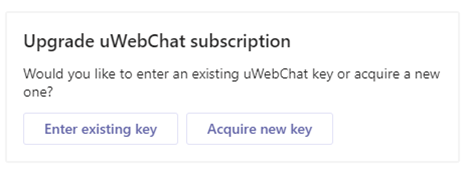
Rich Card with buttons
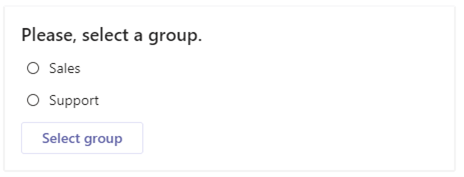
Rich Card with selection
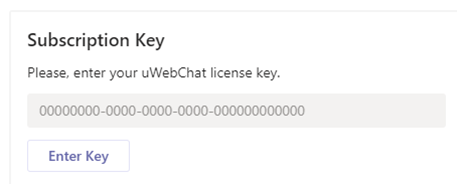
Rich Card with text input
Requirements
- Valid license to use Microsoft Teams per agent using uWebChat.
- Agent e-mail and User Principal Name (UPN) must match. This requires a valid Exchange Online license OR synchronization of on-premises Exchange to Exchange Online using Azure AD Connect.
- Valid license to use OneDrive (for chat log saving feature).
- In the Teams Admin Center, External access to other Microsoft 365 Teams users must be Enabled. If you are using domain whitelisting, please add domain uWebChat.com to your domain list.
- Teams setting EnablePrivacyMode in your Microsoft 365 tenant must be set to value False. This can only be done through PowerShell.
uWebChat editions
uWebChat is available in four different subscriptions. The free version is available in the Teams app catalogue by default, while the other versions require a license key.
| Feature | Free | Basic | Professional | Enterprise |
|---|---|---|---|---|
| Remove branding | No | Yes | Yes | Yes |
| Presence | No | Yes | Yes | Yes |
| Save chat logs | No | Yes | Yes | Yes |
| Leave a message | No | Yes | Yes | Yes |
| Teams Meetings | No | Yes | Yes | Yes |
| Advanced hunting | No | No | Yes | Yes |
| Opening hours | No | No | Yes | Yes |
| Avatars | No | No | Yes | Yes |
| Media sharing | No | No | Yes | Yes |
| Transfer chat | No | No | Yes | Yes |
| Real-time translation | No | No | No | Yes |
| Virtual Agent (AI) | No | No | No | Yes |
| Country blocklist | No | No | No | Yes |
| Restriction | Free | Basic | Professional | Enterprise |
|---|---|---|---|---|
| Domain limit | 1 | 2 | 5 | 10 |
| Group limit | 1 | 2 | 10 | 25 |
| Agent limit | 1 | Per key | Per key | Per key |
Basics of chat
Website visitors can start a chat by clicking on the embedded uWebChat button on your website and entering their name. The chat request will then be sent to the designated agent or group.
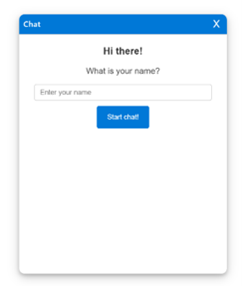
Website visitor starts chat
Agents receive a notification card in their Teams client and can choose to accept or reject the chat request. To end a conversation, agents use the /dc or /disconnect command.
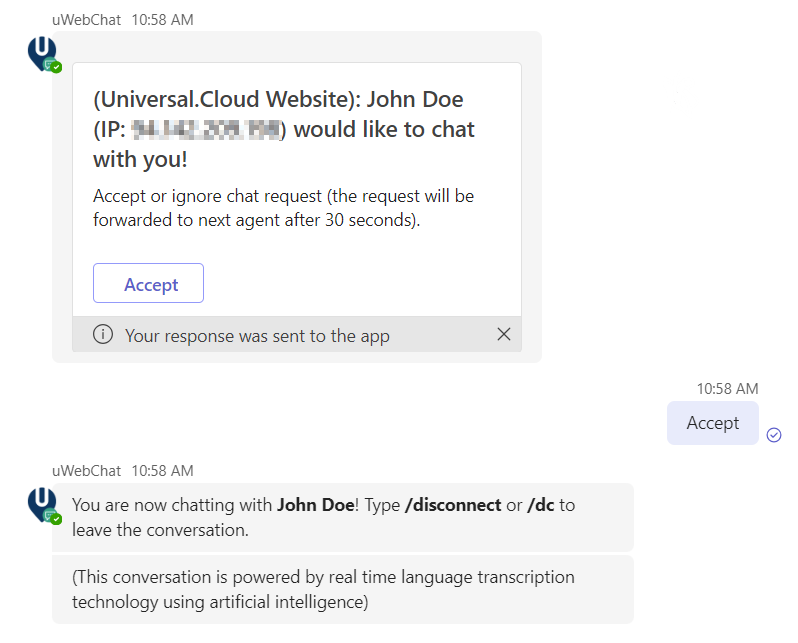
Agent accepts chat
Manual chapters
View the detailed guides per topic:
- Installation & licensing — Install, purchase license and upgrade
- Configuration — First-time setup, embedding, domains, Power Pages
- Features — All features: OneDrive, media, translation, meetings and more
- Managing agents — Register, activate and configure agents
- Managing groups — Groups, hunting, opening hours and presence
- Virtual Agent (AI) — AI-powered Virtual Agent setup with Azure OpenAI
- FAQ & troubleshooting — Frequently asked questions and troubleshooting
Chat With Us
Get instant help from our support team
News & Insights
Teams contact center: compare the best solutions for 2026
2026-04-06
Copilot Cowork: your AI execution layer in Microsoft 365
2026-04-04
The new uWebChat Voice portal is live
2026-03-31
Related Articles
Need More Help?
Can't find what you're looking for? Our support team is ready to assist.
Submit a Support Ticket