uWebChat Voice management portal & dashboard
Guide to the uWebChat Voice management portal: logging in, dashboard overview and managing user permissions.
uAnswer: voice AI that answers your callers naturally
Callers ask their question out loud and get a spoken answer within seconds, 24/7. Part of uWebChat Voice.
Discover uAnswerThe management portal is the central place for managing your uWebChat Voice telephony. You can access the portal at portal.universal.cloud.
Logging in
Log in with the credentials provided to you by Universal Cloud. You can also request a password reset. Please contact Universal Cloud Support if you experience any issues.
After logging in you will reach the main page. Click the uWebChat Voice button on the left side to manage telephony settings.
Dashboard
The dashboard shows a quick summary of your call queues, agents and holidays. Click the tiles or use the left menu to navigate to specific settings.
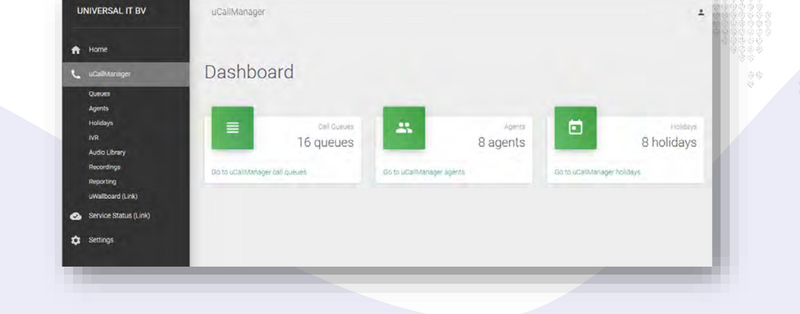
uWebChat Voice Dashboard
The left menu contains the following sections:
- Queues: — Manage your call queues and settings
- Agents: — Manage agents (users) in your organization
- Holidays: — Set public holidays and closing days
- IVR: — Configure interactive voice response menus
- Audio Library: — Manage audio files for queues and IVR
- Recordings: — Listen to call recordings
- Reporting: — View statistics and reports
- uWallBoard: — Real-time overview of queues and calls
Users and permissions
Multiple users within your organization can manage the portal. Every menu item (Queues, Agents, Holidays, etc.) has separate read and write permissions. This makes it possible to give users access to specific sections only.
Please contact Universal Cloud Support for user management and permission configuration.
Chat With Us
Get instant help from our support team
News & Insights
ConnectWise Cloud Backup service interruption: backups temporarily paused
2026-10-17
Cybersecurity Month: 7 things to sort out for your security this October
2026-10-13
The new Copilot: Home, Code and Autopilot in one app
2026-09-28
Related Articles
Need More Help?
Can't find what you're looking for? Our support team is ready to assist.
Submit a Support Ticket