TOPdesk integration for Microsoft Teams
Recognize TOPdesk requests and callers during your Teams call.
uContactManager connects Microsoft Teams to TOPdesk. When a caller reaches you, Teams immediately shows the person with open requests, status and operator — as an Adaptive Card, without searching in TOPdesk.
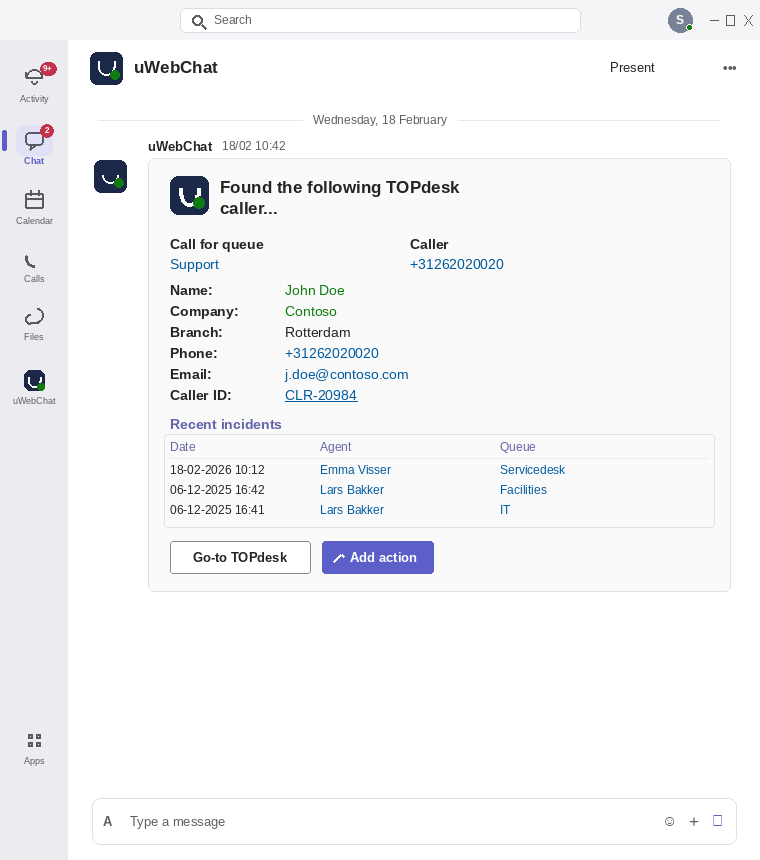

TOPdesk context right in Microsoft Teams
On an incoming call uContactManager matches the number to the caller in TOPdesk and shows open incidents, their status and the operator. Your service desk responds faster and with full context — without switching screens.
What the integration does
Caller recognized instantly
The phone number is matched to the person in TOPdesk via the TOPdesk API.
Open requests and status
See active incidents, their status and operator right as the call comes in.
Open or log a request
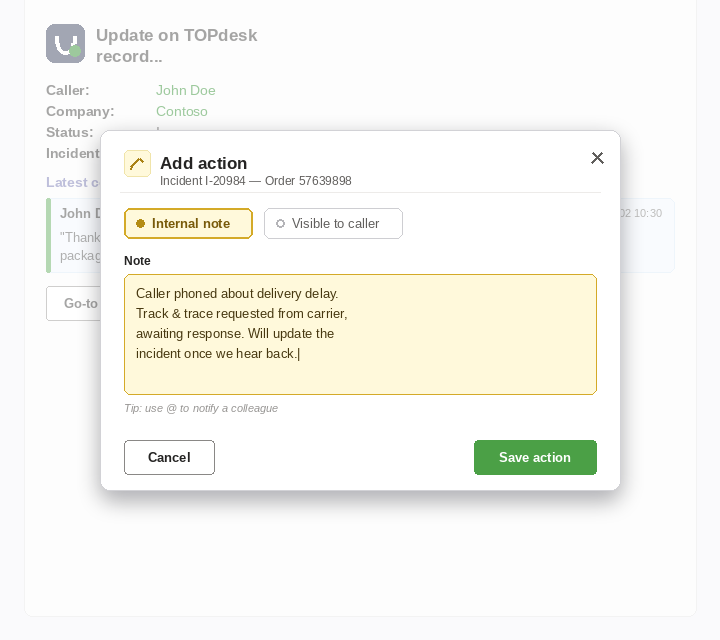
Open the existing request in TOPdesk or log a new one, straight from the call.
See it in action
This is how the customer context appears in Microsoft Teams.
More integrations
uContactManager connects to more systems
See how uContactManager also works with your other CRM, service desk and ERP applications.
All integrationsReady to connect TOPdesk to Teams?
Discover how uContactManager surfaces your customers' TOPdesk context live in Microsoft Teams.
Frequently asked questions
uContactManager links the calling number to the caller in TOPdesk and shows open requests with status and operator — as an Adaptive Card in Microsoft Teams.
Yes. With the 'Add action' popup you add an action or internal note to the request from the call — handy for time tracking and follow-up, without opening TOPdesk.
The integration uses the TOPdesk API with a service account that has only the required rights (read-only plus optional write-back). Agents work in the standard Teams client; no extra software needed.
Want the technical detail?
Download the technical datasheet with the full way of working, the access required and all security measures — intended for your IT and security teams.
uWebChat live chat
Add live chat to your communication platform
Capture website visitors in real time with uWebChat — AI-powered live chat for Microsoft Teams, fully integrated with your contact center.