uWebChat Voice Graph API connection — Connect Microsoft 365
Step-by-step guide to connecting uWebChat Voice with Microsoft 365 via the Graph API. Required for Teams presence and Shifts integration.
Before setting up agents and queues, we recommend connecting to the Microsoft 365 Graph API first. This connection is used for two purposes:
- Fetching the presence (availability status) of Teams users
- Fetching Microsoft Shifts information for agent availability
Connect to Graph API
Go to Settings in the left menu of the Universal Portal and then to the Graph API sub-settings. Click the Connect to Graph API button.
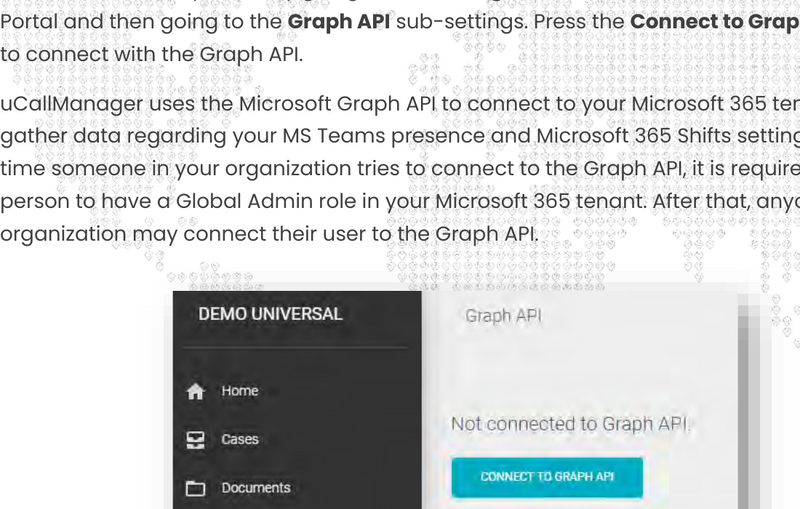
Graph API settings
Your browser will open a Microsoft 365 sign-in page where you need to grant access to the Graph API.
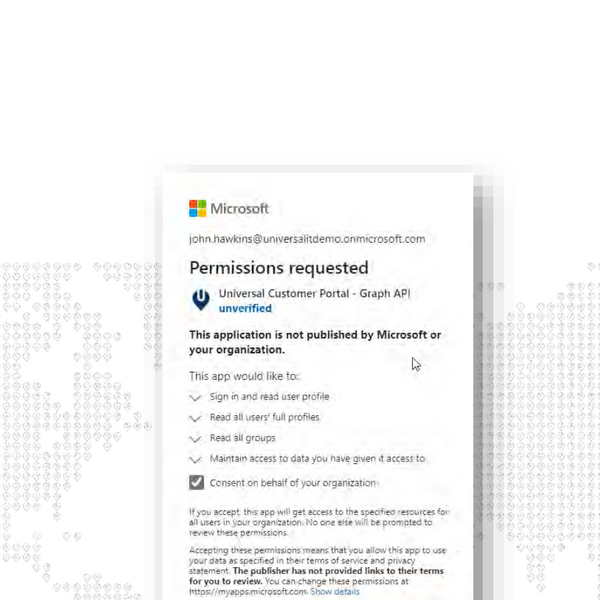
Microsoft consent dialog
Important steps:
- Check Consent on behalf of your organization
- Click Accept
- You will be redirected back to the Universal Portal
The first time someone in your organization connects to the Graph API, this person must have a Global Admin role in your Microsoft 365 tenant. After that, anyone in your organization may connect.
Verify connection
After accepting, you will see confirmation that you are connected to the Graph API.

Graph API connected
Remove connection
To remove the Graph API connection from your tenant, please contact Universal Cloud Support.
Chat With Us
Get instant help from our support team
News & Insights
The new uWebChat Voice portal is live
2026-03-31
Laptop prices are rising fast: order now before it's too late
2026-03-16
Microsoft 365 E7: the new all-in-one suite for AI and productivity
2026-03-12
Related Articles
Need More Help?
Can't find what you're looking for? Our support team is ready to assist.
Submit a Support Ticket