Most organisations use Microsoft Teams daily — for chat, video meetings and collaboration. But when it comes to making phone calls, those same organisations fall back on a separate phone system. A standalone PBX, a SIP provider with no Microsoft integration, or a legacy Mitel or Avaya system that's been running for years. The result: two worlds that don't talk to each other. Contact details that don't sync, no call history in Teams, and employees constantly switching between apps.
That's a missed opportunity. Because once you set up business telephony through Microsoft Teams, something fundamental changes: every phone call becomes part of your digital workplace. And that gives you access to functionality that's simply impossible with a traditional phone system — like automatic call transcription and AI summaries with Microsoft 365 Copilot.
Imagine this: an account manager has a phone call with a client about a complex proposal. After the call, he knows exactly what was discussed — not because he took notes, but because Teams transcribed the entire conversation and Copilot automatically created a summary with action items. This isn't science fiction. This is what organisations experience today when they consolidate their communications in Teams.
Why telephony in Teams is the foundation
Before we dive deeper into transcription, let's take a step back: why would you run your telephony through Teams at all? The short answer: integration. When voice, chat, meetings and documents all live in one platform, possibilities emerge that are impossible with separate systems.
In our detailed article on calling via Microsoft Teams we compare the three available options — Direct Routing, Operator Connect and Calling Plans — with actual pricing. But regardless of which option you choose, the result is the same: your phone calls become part of the Microsoft 365 ecosystem. And that means you can transcribe them, analyse them and have them summarised by AI.
What is call transcription in Teams?
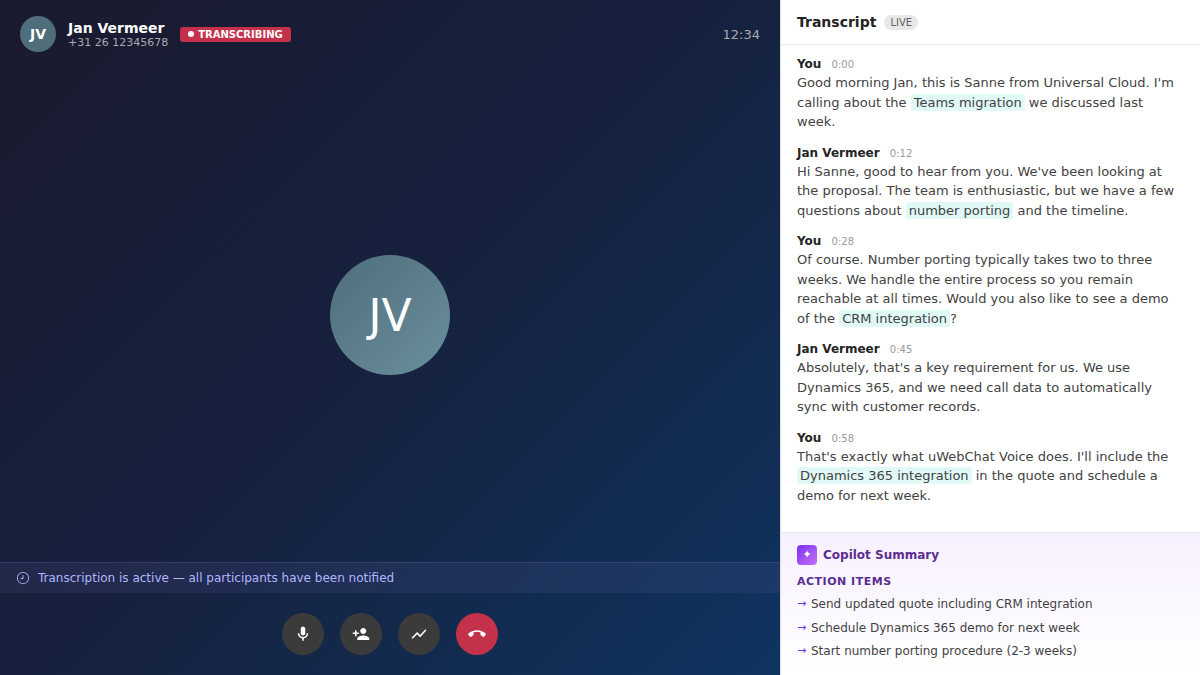
Call transcription in Microsoft Teams automatically converts speech to text — in real time, during the call. This works not only for video meetings, but also for 1-to-1 phone calls, including PSTN calls (regular phone calls to landline and mobile numbers). Exactly the type of calls you might still be making through a separate phone system today.
In practice, this means:
- Every outbound and inbound phone call can be transcribed
- The transcription appears live in the call window
- After the call, the full transcript is saved and searchable
- Speakers are automatically identified and labelled
For organisations that handle dozens or hundreds of customer calls daily, this is a game changer. No more missed details, no more "what did the customer say again?" — everything is documented. And this is functionality you only get when you call through Teams, not alongside it.
Which license do you need?
Transcription in Teams is not included in every license. You need at least one of the following Microsoft 365 licenses:
| License | Transcription supported |
|---|---|
| Microsoft 365 Business Standard | Yes |
| Microsoft 365 Business Premium | Yes |
| Microsoft 365 E3 | Yes |
| Microsoft 365 E5 | Yes |
| Microsoft 365 Business Basic | No |
Additionally, for PSTN calls you also need a Teams Phone license (approximately €8/user/month), plus a calling solution such as Direct Routing, Operator Connect or Calling Plans. Read more about this in our article on calling via Microsoft Teams.
Enabling transcription
As an IT administrator, you enable transcription in the Teams Admin Center under Calling Policies. You can configure this per user or organisation-wide. The setting is called *Transcription* and must be set to On.
Important: once transcription is started during a call, the other party hears a spoken notification that the call is being transcribed. This is required by privacy legislation and is built into Teams automatically — no additional configuration needed.
From transcription to action with Copilot
A transcription by itself is already valuable. But the real power lies in what you do with it. And that's where Microsoft 365 Copilot comes in.
With Copilot, you can automatically after a call:
- Generate a summary — the essence of the conversation in a few paragraphs
- Extract action items — who needs to do what, and when?
- Formulate follow-up steps — concrete next steps based on the conversation
- Analyse sentiment — was the customer satisfied, frustrated or neutral?
- Ask specific questions — "What did the customer say about the delivery date?" or "Which objections were raised?"
This not only saves time but also improves the quality of follow-up. An employee who has a Copilot summary of each of their 8 phone calls that day misses nothing and can follow up more effectively.
Real-world example: customer service
A customer service agent handles 30 calls per day. Without transcription, she manually notes the key points and types a summary into the CRM after each call. With transcription and Copilot:
- The call is automatically transcribed
- Copilot creates a summary with key points
- The summary can be saved or shared immediately
- Action items are automatically extracted
The result? Less admin time, better case documentation and higher customer satisfaction because nothing falls through the cracks.
Why business telephony in Teams is so valuable
Call transcription is just one of many benefits of telephony in Teams. When you run your entire business telephony through Microsoft Teams, you benefit from:
- One platform for everything — calling, chatting, meeting and collaborating in the same app
- Reachable on any device — desktop, laptop, smartphone or IP phone
- Hybrid work without compromises — call from home as if you're in the office
- Lower costs — up to 40% savings via Direct Routing compared to traditional telephony
- Integration with your entire Microsoft 365 environment — calendar, contacts, Outlook, SharePoint and more
- AI integration with Copilot — summaries, transcriptions and smart suggestions
- No separate phone system — no maintenance, no hardware, no separate vendor
- Scalability — new employee? Assign a license and done
uWebChat Voice: future-proof business telephony
Standard Teams telephony is an excellent starting point. But organisations that want to take their availability and customer communication to the next level need more. That's exactly where uWebChat Voice makes the difference.
uWebChat Voice is Universal Cloud's platform that extends Microsoft Teams into a full-featured communications platform. Not as a replacement for Teams, but as an enrichment — built on the same infrastructure.
What does uWebChat Voice add?
- Skill-based routing — incoming calls are automatically routed to the agent with the right expertise
- Real-time wallboards — live dashboards with queues, availability and performance, also on mobile
- Comprehensive reporting — service levels, wait times, call volumes and trends
- CRM integration — customer information visible during the call (TOPdesk, Salesforce, Dynamics 365, ServiceNow, HubSpot)
- Omnichannel inbox — not just voice, but also webchat, WhatsApp and email from the same Teams interface
- Call recording — record calls for quality, training or compliance
- IVR and phone menus — professional phone menus for optimal availability
- Management portal — full control over call flows, users and configuration
The combination: transcription + uWebChat Voice
The real power emerges when you combine call transcription with uWebChat Voice. Think of:
- Automatically linking call summaries to the right CRM record — the transcription plus Copilot summary directly attached to the customer file
- Quality monitoring — managers can review call transcriptions without having to listen in
- Training — new employees learn from real call transcriptions instead of simulated scenarios
- Compliance — complete call history for audits and regulations
- Trend analysis — which topics come up most frequently in customer calls?
This is what we mean by future-proof: not just calling, but a complete ecosystem of voice, text, data and AI working together to help your organisation perform better.
Privacy and compliance
When it comes to call transcription, privacy is crucial. Microsoft has this well covered:
- Automatic notification — the caller hears a spoken message that the call is being transcribed
- Opt-out possible — users can disable transcription if policy allows
- Data within Microsoft 365 — transcriptions are stored in the Microsoft 365 tenant and fall under the same security and compliance rules
- GDPR compliant — Microsoft complies with European privacy legislation
- Retention policies — via Microsoft Purview you can set retention rules for transcriptions
As an organisation, it's wise to inform your employees about the use of transcription and establish clear guidelines. Transparency towards both employees and callers is essential.
Getting started
Want to deploy call transcription in your organisation? Here's what you need:
- Microsoft 365 Business Standard, Business Premium, E3 or E5 license — unsure which one? Read our E3+EMS vs. Business Premium comparison
- Teams Phone license with a calling solution (Direct Routing recommended) — see our article on calling via Teams for a pricing comparison
- Enable transcription in the Teams Admin Center (Calling Policies)
- Optional: Microsoft 365 Copilot for automatic summaries and action items
- Optional: uWebChat Voice for advanced contact centre features and CRM integration
Universal Cloud helps you at every step — from license advice to implementation and optimisation. With 20+ years of experience in business telephony and hundreds of successful Teams migrations, we know exactly how to integrate transcription and AI seamlessly into your workflow.
View our Teams Phone page or discover uWebChat Voice for the complete picture. Want to learn more about unifying all your communications in Teams? Prefer to discuss directly? Get in touch for a no-obligation consultation.