Work Cloud
uWelcome
Automate business processes in Microsoft Teams
Streamline onboarding, offboarding and device replacement with a structured Teams app. From form to completed tasks — fully transparent and efficient.
Take control of your business processes
uWelcome is a Microsoft Teams app that transforms business processes like onboarding, offboarding and device replacement into structured, trackable workflows.
Employees fill out a simple form, after which tasks are automatically created and assigned. Through the dashboard you can track progress in real-time: how many tasks are completed, which are still running and what the overall status is. uWelcome is developed by Universal Cloud and deployed at customers where we provide asset management. It is also our proven example of how Office processes can be automated in Teams — from HR to compliance.
What uWelcome offers
A complete solution for process automation within Microsoft Teams
Structured process forms
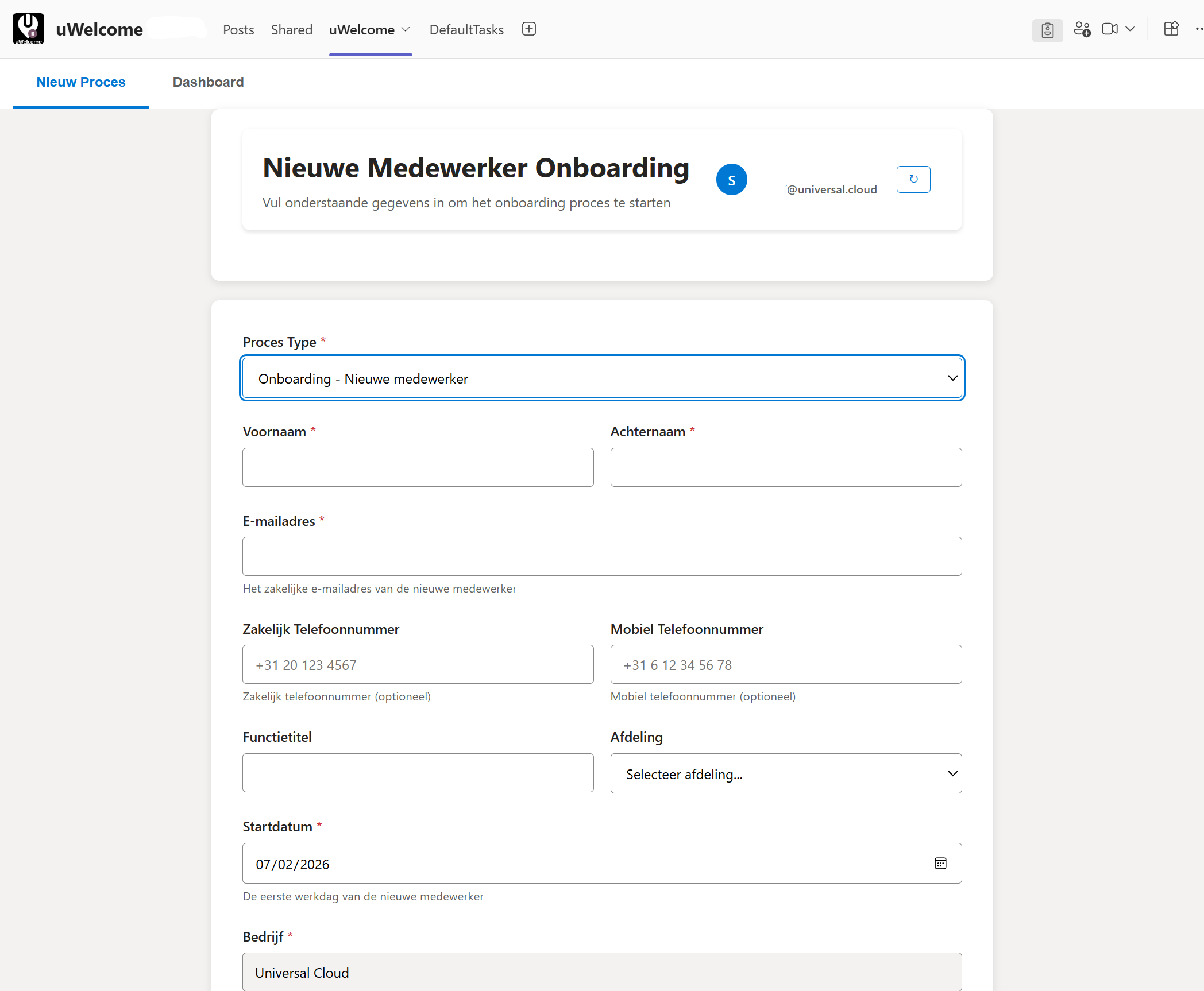
Start onboarding, offboarding or device replacement processes with a simple form. All required information is captured upfront.
Automatic task assignment
After filling in the form, tasks are automatically created and assigned to the right employees or teams.
Real-time dashboard
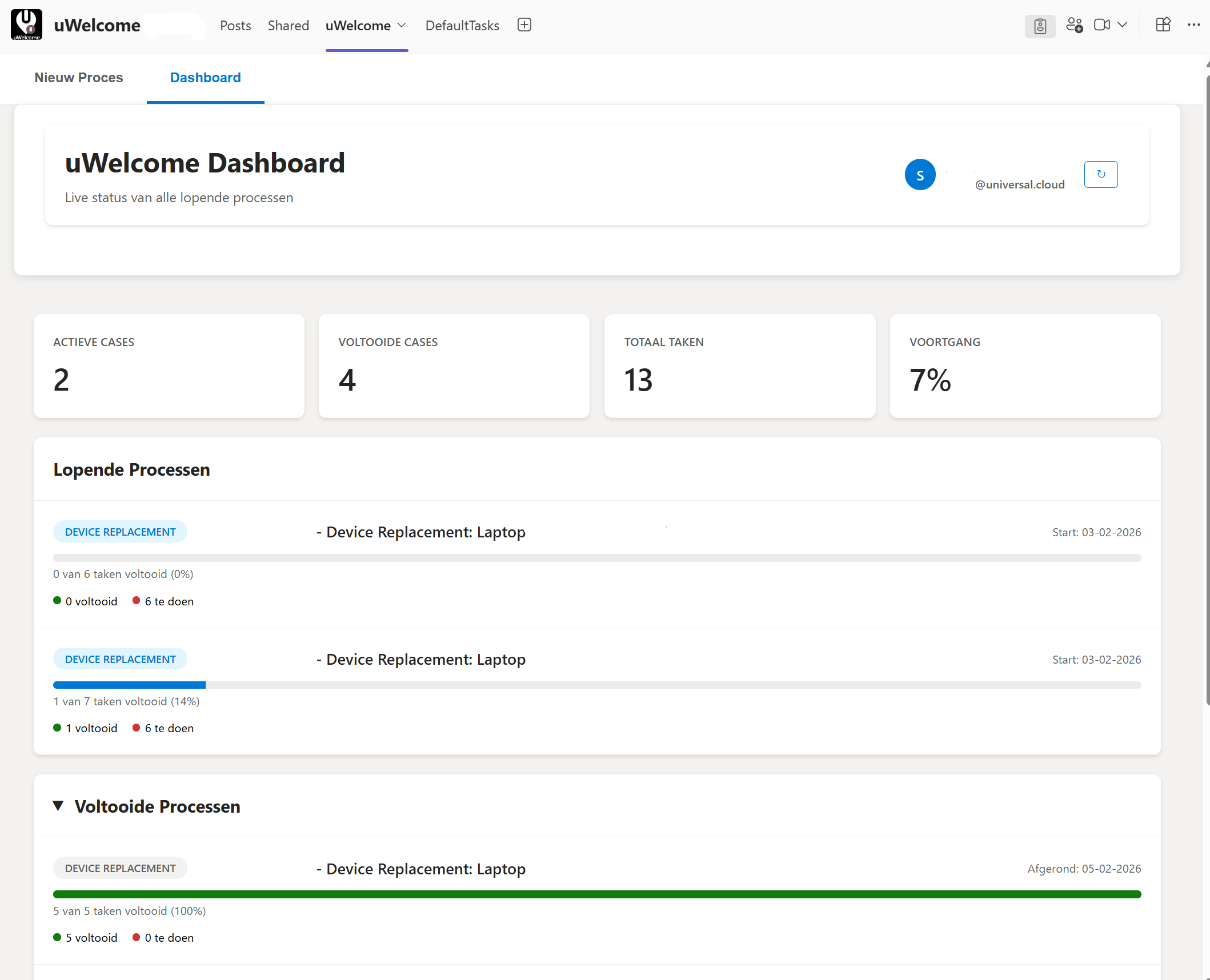
Track the progress of all running and completed processes. View active cases, completed cases, total tasks and progress percentages.
Fully in Microsoft Teams
No external tooling needed. uWelcome runs entirely within Microsoft Teams, making adoption easy.
Customizable process types
Configure process types to your needs: new employee onboarding, offboarding, device replacement or custom workflows.
Audit trail and reporting
Every action is logged. You always have a complete overview of who did what and when.
How it works
From request to completed process in four simple steps
Start a process
An employee opens uWelcome in Teams and selects the process type: onboarding, offboarding or device replacement. The form is filled in with the required information.
Tasks are created
Based on the process type, the correct tasks are automatically created and assigned to responsible employees or departments.
Track progress
Through the dashboard you can see the real-time status of each process: how many tasks are completed, which are still open and what the total progress is.
Complete the process
Once all tasks are completed, the process is automatically marked as finished. A complete overview remains available for audit and reporting.
Use cases
uWelcome is flexibly deployable for various business processes
IT asset management
Streamline device provisioning, replacement and returns with automated tasks and progress overviews. Ideal for organizations with managed IT environments.
HR onboarding
Automate the onboarding process for new employees: from account creation and license assignment to workplace setup and welcome communication.
Offboarding
Ensure all steps are followed when an employee leaves: deactivate accounts, return devices, release licenses and archive data.
Device replacement
Manage the complete replacement process: from request and ordering to configuration, delivery and return of the old device.
Compliance processes
Standardize compliance-related workflows such as access control reviews, security audits and policy acceptance by employees.
Custom workflows
Configure uWelcome for any business process that benefits from structured tasks and progress tracking within Microsoft Teams.
Why uWelcome
Efficiency
No more loose emails or spreadsheets. All processes run structured through Teams with automatic task assignment and progress overviews.
Visibility
Real-time dashboards show exactly where each process stands. Management and operators always have oversight of all running and completed cases.
Microsoft Teams-native
Built for and in Microsoft Teams. No extra licenses, no external tooling, no context switching. Your employees work in the environment they already know.
Dashboard
Track the progress of all running and completed processes. View active cases, completed cases, total tasks and progress percentages.
Onboarding
Start onboarding, offboarding or device replacement processes with a simple form. All required information is captured upfront.
Related Services
Often combined with uWelcome
Ready to streamline your business processes?
Discover how uWelcome automates onboarding, offboarding and other processes within Microsoft Teams.
SCHEDULE A DEMO